Cigano Tablet Edition1.2.2
Publisher Description
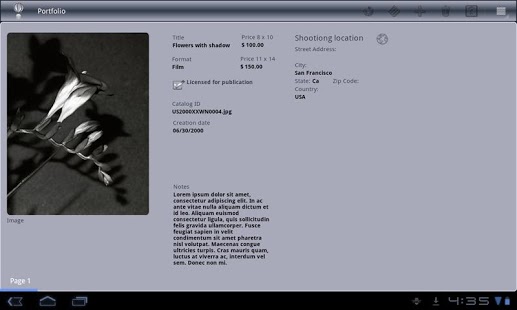
Designed for Honeycomb tablets!
With Cigano you can organize your personal and professional activities, clients, events, and more!
Cigano is a personal mobile database application. Easily create customized databases to organize and store information that is important to you. Take your important information with you where ever you go and access it with just a few touches. Cigano was designed to be easy to use and customizable to your needs.
Easily and quickly create a customized database with the fields that are important to you including:
Singe/Multi-line text fields
Images
Date fields
Address fields
A customizable list of choices
Checkbox fields
Fields for displaying currency
Numerical fields
Notification fields
With just a touch create databases for school, work, or recreation. Organize trips, collections, inventory, sales, events, and just about anything you can imagine.
Cigano builds upon the fun and practicality of using Android smart phones and tablets.
Your database records can be clearly viewed and navigated in the form view. Creating and deleting records is as easy a click of the finger tip. Editing a fields value is also easily done from the form view by clicking the edit icon to the right of the field's value. It couldn't be simpler!
The tablet version also includes features to filter your data by various criteria helping you to get to exactly the records you're most interested in. In addition you can backup your databases to external storage for safe keeping.
About Cigano Tablet Edition
The company that develops Cigano Tablet Edition is Cafe Silencio, LLC.. The latest version released by its developer is 1.2.2. This app was rated by 1 users of our site and has an average rating of 5.0.
To install Cigano Tablet Edition on your Android device, just click the green Continue To App button above to start the installation process. The app is listed on our website since 2012-03-03 and was downloaded 11 times. We have already checked if the download link is safe, however for your own protection we recommend that you scan the downloaded app with your antivirus. Your antivirus may detect the Cigano Tablet Edition as malware as malware if the download link to net.cafesilencio.cigano.tablet is broken.
How to install Cigano Tablet Edition on your Android device:
- Click on the Continue To App button on our website. This will redirect you to Google Play.
- Once the Cigano Tablet Edition is shown in the Google Play listing of your Android device, you can start its download and installation. Tap on the Install button located below the search bar and to the right of the app icon.
- A pop-up window with the permissions required by Cigano Tablet Edition will be shown. Click on Accept to continue the process.
- Cigano Tablet Edition will be downloaded onto your device, displaying a progress. Once the download completes, the installation will start and you'll get a notification after the installation is finished.
Program Details
System requirements
Download information
Pricing
Version History
version 1.2.2
posted on 2012-03-03
minor bug fix to resolve crash that happened when deleting the last record in a database.
version 1.2.2
posted on 2012-03-03
Several fixes and updates
